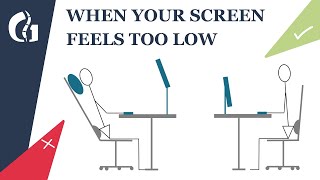
How To Choose The Best Screen Height To Avoid Neck Pain, by Olivier Girard - the Posture Guy on YouTube. 5 min 46 s.
- Video length
- 5 min 46 s
- Time to do it
- 10 minutes
- Difficulty
- Easy
- Steps
- 8
What you need
Steps
Sit back in your chair with your feet flat on the floor. Relax your shoulders and look straight ahead at the wall in front of you.
Note where your eyes point when your head is level and your neck is not bent forward or back. That line is your target screen height.
Place the monitor so the top edge of the screen sits at or just below eye level. The screen should tilt slightly back.
Sit about an arm's length from the screen. If you lean forward to read, the text is too small or the screen is too far away.
For a laptop, raise it on a stand or a stack of books until the screen top is near eye level. Then plug in an external keyboard and mouse.
Check that your shoulders stay down and your upper back is not hunched. If they creep up, lower the screen slightly.
If you wear progressive or bifocal lenses, tilt the screen back a little or lower it slightly so you look through the right part of the lens.
If you use a sit stand desk, raise the desk and screen together so the top of the screen stays near eye level when you stand.
Tips and common mistakes
A screen that is too low makes you drop your chin and strains the upper trapezius muscles.
Laptop-only work almost always means a low screen, so an external keyboard is the key fix.
Take a short break every 30 minutes to stand and roll your shoulders back.
Progressive lenses can push you to tilt your head up, so adjust the screen angle before blaming your chair.
Questions
Should the top or the middle of the screen be at eye level?
Aim for the top edge of the screen at or just below eye level. This lets your eyes drop slightly to read without bending your neck down.
Can I use a laptop without an external keyboard?
You can, but raising the laptop to eye level then puts the keyboard too high for your wrists. A cheap external keyboard and mouse solve this.
Does this help lower back pain too?
It can. A screen at the right height stops you from slumping forward, which takes strain off your lower back as well as your neck.
This guide was drafted from the video's details and general task knowledge. It has not been checked against the full video. Check the video and relevant product instructions before following a procedure. Report a correction.