How to Set Up a Laptop Anywhere You Work, by Haven Chiropractic Posture & Scoliosis on YouTube. 1 min 48 s.
- Video length
- 1 min 48 s
- Time to do it
- 10 minutes
- Difficulty
- Easy
- Steps
- 7
What you need
Steps
Sit at a sturdy chair and a table or desk rather than a soft couch or squishy seat. A soft seat lets your hips roll back and your lower back round.
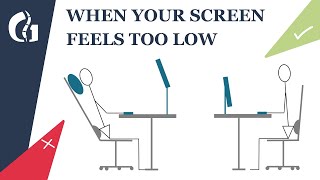
Raise the laptop on a stand so the top third of the screen sits at about eye level. With no stand yet, a stack of books or a firm box works the same way.
Push the screen back to about an arm's length from your face. Sit back into the chair instead of leaning your head forward toward the screen.
Add a wireless keyboard and mouse so the screen can stay high while your hands stay low. The keyboard comes down to your hands, not your hands up to the laptop.
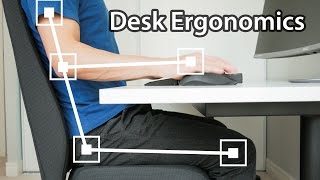
Set the keyboard close enough that your elbows stay near your sides and your shoulders drop down and back. Keep your wrists flat rather than bent upward.
Place the mouse beside the keyboard at the same height, so you are not reaching forward or up to click.
Do a final check: top third of the screen level with your eyes, arms relaxed, back supported, feet flat on the floor.
Tips and common mistakes
If your head still drops forward, the screen is too low, so add another book or raise the stand.
Keep the laptop stand and keyboard together in one bag so you can repeat the same setup wherever you work.
Take a short break every 30 to 40 minutes to stand up and roll your shoulders back.
If neck or back pain keeps coming back, get your posture assessed in person rather than guessing at adjustments.
Questions
Do I really need a separate keyboard?
Yes, if you raise the screen. Once the laptop is up at eye level, the built-in keyboard is too high for comfortable typing, so a wireless keyboard and mouse let both ends sit where they belong.
How high exactly should the screen be?
Aim for the top third of the screen at about eye level, roughly an arm's length away. You should be looking slightly down at the middle of the screen, not tipping your head back or forward.
Can I use this setup on a couch or bed?
It is much harder. Soft surfaces make your hips roll back and your spine round, so use a firm chair and a table when you can, even for short sessions.
This guide was drafted from the video's details and general task knowledge. It has not been checked against the full video. Check the video and relevant product instructions before following a procedure. Report a correction.