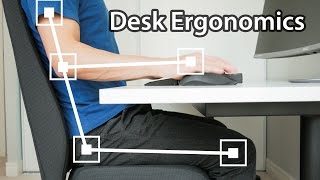
When Your Monitor Feels Too Low (It’s Not Always The Screen Height), by Olivier Girard - the Posture Guy on YouTube. 3 min 47 s.
- Video length
- 3 min 47 s
- Time to do it
- 10 minutes
- Difficulty
- Easy
- Steps
- 6
What you need
Steps
Check the basic height rule first. Sit down and look straight ahead: the top edge of the screen should sit near eye level, about an arm's length away.
Sit back against the backrest before you judge the height. If you perch forward or slump, the screen will read as too low even when it is not.
Stop reaching for the keyboard. Pull the keyboard and mouse close so your elbows stay near your sides at roughly 90 degrees and your shoulders drop.
Look at how far you recline. A strong backward lean loads the neck and chest and makes the screen feel lower, so bring the backrest more upright or move the screen closer.
Tilt the screen so it faces your eyes. Tip the top edge back slightly, around 10 to 20 degrees, so the surface is square to your face rather than flat and vertical.
Re-test before you change any hardware. Sit back, relax your shoulders, look at the screen and see if it now feels level. Only raise the monitor if it still sits below eye level.
Tips and common mistakes
Fix one thing at a time and sit in the new position for a few minutes before judging it.
If you work on a laptop, tilt the screen back a little and raise the machine only as far as your neck needs, then use an external keyboard.
Take a short break every 30 to 40 minutes and roll your shoulders back to release tension built up while sitting.
A pile of books under the monitor is fine for testing a new height before you buy a stand.
Questions
Why does my screen feel low when it is already at eye level?
Your torso angle is often the cause. When you recline or lean forward, your head drops and your eyes point lower, so the screen looks further down than it really is.
Do I need to buy a monitor stand?
Not always. Adjusting your backrest, pulling the keyboard closer and tilting the screen solves many cases. Buy a stand only if the screen is still below eye level after those changes.
How far should the screen be from my face?
About an arm's length, so roughly 50 to 70 cm. Move it closer if you lean back and further away if you tend to push your head forward.
This guide was drafted from the video's details and general task knowledge. It has not been checked against the full video. Check the video and relevant product instructions before following a procedure. Report a correction.