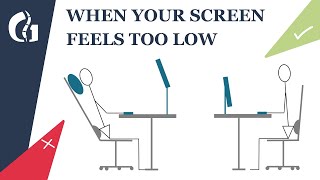
How To Make Your Laptop Setup More Ergonomic!, by Jesse Chen on YouTube. 4 min 44 s.
- Video length
- 4 min 44 s
- Time to do it
- 15 minutes
- Difficulty
- Easy
- Steps
- 6
What you need
Steps
Check your desk height. Aim for a surface about 72 to 75 cm (28 to 30 inches) from the floor so your forearms sit level when you type.
Set your chair so your feet are flat on the floor and your hips sit slightly higher than your knees. Add a footrest if your feet dangle, and leave a small gap behind your knees.
Raise the laptop on a stand so the top of the screen sits at or just below eye level, about an arm's length away. A stack of books works fine if you don't own a stand.
Put an external keyboard at elbow height, flat or tilted slightly away from you. Keep your wrists straight and your shoulders relaxed instead of hunched up.
Place the mouse right next to the keyboard at the same height. Move it with your whole arm, not just your wrist, to avoid strain.
Sit in the new setup for a few minutes and check for tension in your neck, shoulders and wrists. Adjust the screen height or chair until you feel relaxed.
Tips and common mistakes
Keep the screen about an arm's length from your face; sitting too close causes eye strain.
Don't rest your wrists on the desk edge while typing, as it bends them upward and adds strain.
Give your body a day or two to adjust to the new position before deciding it feels wrong.
Questions
Do I really need an external keyboard and mouse?
Yes, if you raise the laptop to eye level, the built-in keyboard and trackpad end up too high to use comfortably. A separate keyboard and mouse let you keep your hands low.
What if my desk is too high or too low?
If the desk is too high, raise your chair and add a footrest so your feet stay supported. If it is too low, put sturdy blocks under the legs or use a different desk.
How do I know the screen height is right?
When you sit up straight, the top line of text should be roughly level with your eyes, so you look slightly down at the rest of the screen.
This guide was drafted from the video's details and general task knowledge. It has not been checked against the full video. Check the video and relevant product instructions before following a procedure. Report a correction.