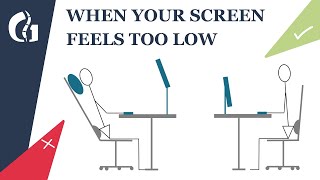
The Perfect Ergonomic Desk Setup To Avoid Back & Neck Pain, by Body Fix Exercises—for over 50s on YouTube. 3 min.
- Video length
- 3 min
- Time to do it
- 20 minutes
- Difficulty
- Easy
- Steps
- 9
What you need
Steps
Set your chair height so your feet rest flat on the floor and your knees sit at about 90 degrees. If your feet dangle, add a footrest or a box under them.
Sit back against the backrest and adjust the lumbar support so it fills the curve of your lower back. Keep your hips slightly higher than your knees.
Raise your screen until the top of the display is level with your eyes. Use a laptop stand, a monitor riser or a stack of books.
Push the screen back to about an arm's length, roughly 50 to 70 cm from your face, and tilt it back slightly so you look straight ahead.
If you work on a laptop, add an external keyboard and mouse. The stand keeps the screen high while your hands stay low.
Adjust your seat or desk height so your elbows sit at about 90 degrees and your forearms are level with the desk.
Bring the keyboard and mouse close to your body. Keep your wrists straight, shoulders relaxed and upper arms hanging by your sides.
Place a lamp or desk light to the side of the screen, not behind or in front of it, to cut glare and stop you leaning in.
Stand up and move for a minute every 30 minutes. Set a timer or use a break reminder app so you actually do it.
Tips and common mistakes
Do not perch on the front edge of the chair; slide your hips back until your back touches the support.
A laptop alone is never ergonomic for long days, so pair it with a stand plus a separate keyboard and mouse.
Check your setup by sitting down and looking straight ahead: your eyes should land near the top edge of the screen.
If back or neck pain continues after fixing your setup, see a health professional rather than pushing through it.
Questions
How high should my monitor be?
The top of the screen should sit at eye level, so you look slightly down at the middle of the display. If you wear varifocals, you may prefer it a little lower.
Can I use a laptop without a stand?
Only for short sessions. A laptop on the desk forces you to look down and reach forward, so raise it and add a separate keyboard and mouse for longer work.
What if I am much taller or shorter than average?
Fix the chair first so your feet are flat, then raise the desk or add a keyboard tray if your elbows are not at 90 degrees. Use a footrest if your feet leave the floor.
This guide was drafted from the video's details and general task knowledge. It has not been checked against the full video. Check the video and relevant product instructions before following a procedure. Report a correction.