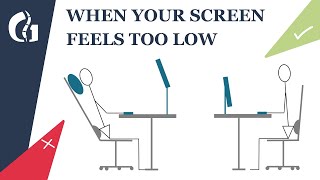
5 Ways You're Sitting Wrong at Your Desk - Computer Desk Setup Ergonomics, by David Zhang on YouTube. 4 min.
- Video length
- 4 min
- Time to do it
- 20 minutes
- Difficulty
- Easy
- Steps
- 8
What you need
Steps
Raise the laptop so the top third of the screen sits level with your eyes. A stand, box or stack of books works. Push the screen back to about an arm's length away.
Set the chair height so your feet rest flat on the floor and your knees bend to roughly 90 degrees. If your feet dangle, add a footrest or a box.
Check that your hips sit slightly higher than your knees and your thighs are roughly parallel to the floor. Slide forward until your back touches the backrest.
Adjust the armrests so they just touch your forearms. Your elbows should sit at about 90 degrees with your shoulders relaxed, not pulled up.
Tuck a small cushion or rolled towel into your lower back so the natural curve of your spine is supported.
Once the screen is raised, plug in an external keyboard and mouse and place them close to your body. Keep your wrists flat and straight, not bent up or down.
Keep the mouse right next to the keyboard so you are not reaching sideways. Let your upper arms hang close to your ribs.
Take breaks. Every 20 minutes, look at something 20 feet away for 20 seconds, and stand up and walk around every 30 to 60 minutes.
Tips and common mistakes
Do not tilt your head down to meet a low screen, since that is what strains your neck over a long day.
If your wrists ache, check the keyboard angle first, because a keyboard with the feet flipped up bends your hands back.
Move your whole setup before you start working rather than adjusting it mid-task, so you do not settle into a slouch.
See a doctor or physiotherapist if you get numbness, tingling or pain that does not ease after you change your setup.
Questions
How high should my laptop screen be?
The top third of the screen should be level with your eyes, so your gaze drops slightly when you read. That usually means raising the laptop on a stand and using a separate keyboard.
Do I really need a laptop stand?
Not if you already have something stable to lift the laptop, like a box or a stack of books. The key is getting the screen up to eye level while keeping the keyboard low.
How long does it take to get used to a new setup?
Give it a week or two of daily use. A correct setup can feel odd at first if you are used to slouching, so adjust one thing at a time.
This guide was drafted from the video's details and general task knowledge. It has not been checked against the full video. Check the video and relevant product instructions before following a procedure. Report a correction.