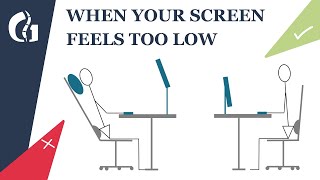
5 Common Desk Setup Mistakes (And How To Fix Them), by Reid Wilking on YouTube. 11 min 12 s.
- Video length
- 11 min 12 s
- Time to do it
- 45 minutes
- Difficulty
- Easy
- Steps
- 7
What you need
Steps
Clear your desk and decide what you actually use each day. Put looks second and pick gear that fits your work, not just your photos.
Check your computer's performance. Close startup apps, free up disk space and keep the machine cool so it does not slow you down mid-task.
Match your tools to your workflow. Group the devices you use together, like keyboard, mouse and notebook, so you are not reaching across the desk.
Set your chair height so feet sit flat and knees are near 90 degrees. Raise the monitor so the top of the screen is at or just below eye level.
Bring the keyboard and mouse close to your body and keep elbows near 90 degrees. Add armrest pads if your forearms rest on a hard edge.
Tidy cables with clips or a tray so they stay out of the way. Route them along the back edge of the desk.
If you work at a desk daily, set up a dedicated spot even if it is small. A fixed place makes good posture and habits easier to keep.
Tips and common mistakes
Fix ergonomics before buying decorative items, since posture affects you every day.
Raise your monitor with a stand or arm instead of stacking books that can slip.
Take a short break every 30 to 45 minutes to stand and stretch your back and wrists.
Keep the mouse close so you are not stretching your shoulder to reach it.
Questions
What is the most important desk setup fix?
Ergonomics. Getting chair height, monitor height and keyboard position right matters more than how the desk looks.
Do I need a monitor arm?
No. A stack of books or a simple stand can raise your screen to eye level. An arm just frees up desk space.
How high should my monitor be?
The top of the screen should sit at or slightly below eye level, about an arm's length away from your face.
This guide was drafted from the video's details and general task knowledge. It has not been checked against the full video. Check the video and relevant product instructions before following a procedure. Report a correction.