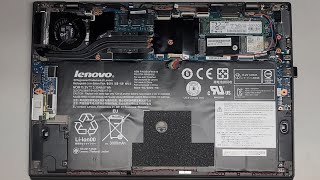
How to replace the Lenovo ThinkPad X1 P1 battery (L17C4P72 Mobik X1 1st 2nd Gen, P1 1st 2nd Gen), by Tutorial Geek on YouTube. 3 min 57 s.
- Video length
- 3 min 57 s
- Time to do it
- 20 minutes
- Difficulty
- Medium
- Steps
- 9
What you need
Steps
Shut the laptop down completely and unplug the charger. Hold the power button for a few seconds to drain leftover charge.
Flip the laptop over and remove the screws holding the bottom cover. Keep them in a cup so none go missing.
Slide a plastic pry tool into the seam and work around the edges until the bottom cover lifts off. Set it aside.
Find the battery connector on the motherboard. Unplug it before touching anything else.
Remove the screws that hold the battery in place, then lift the old battery out of the chassis.
Lay the new L17C4P72 battery in the same spot and refit its screws. Do not overtighten them.
Plug the battery connector back into the motherboard and press it down until it sits flush.
Refit the bottom cover and replace all the screws. Press the edges down so the clips snap shut.
Plug in the charger and power on. Check that the laptop sees the new battery in the system settings.
Tips and common mistakes
If the new battery is not recognised, open the laptop again and check the connector is fully seated.
Discharge the new battery to about 5 percent, then charge it and repeat three or four times to wake it up.
Work on a clean, flat surface and keep track of screw lengths, since some holes use shorter screws.
Questions
Which ThinkPad models does this battery fit?
The L17C4P72 fits first and second gen ThinkPad X1 Extreme and P1 laptops. Check your model number before ordering, since other ThinkPads use different packs.
Do I need to disconnect the battery before removing it?
Yes. Unplug the battery connector from the motherboard first so no power is flowing while you work.
How long should the new battery last?
The listing says the cells are rated for up to 500 charge cycles. Real life depends on how you use and charge the laptop.
This guide was drafted from the video's details and general task knowledge. It has not been checked against the full video. Check the video and relevant product instructions before following a procedure. Report a correction.