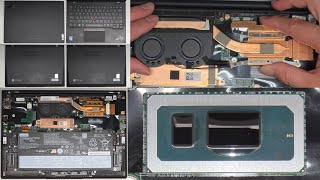
Lenovo X1 ThinkPad Carbon Gen 8 Laptop. Easy DIY at home disassembly repair or upgrade instructions, by SellBroke on YouTube. 11 min 24 s.
- Video length
- 11 min 24 s
- Time to do it
- 30 minutes
- Difficulty
- Medium
- Steps
- 9
What you need
Steps
Shut the laptop down and unplug the charger and every cable. Turn it over and look at the five captive screws on the bottom cover.
Power on and press F1 at the Lenovo logo to enter BIOS. Go to Config, then Power, and choose Disable built-in battery. The laptop shuts off and the internals are now unpowered.
Loosen all five captive screws on the bottom. They stay attached to the cover, so you do not need to take them out completely.
Push a plastic pry tool into the seam near the hinge and work it along the edges until the clips pop. Lift the bottom cover off slowly.
Unplug the battery connector from the motherboard before touching anything else. Ease the plug straight up with a plastic tool, never a metal one.
Unscrew the battery, note where each screw came from, and lift it out. Fit the new battery, screw it down and reconnect the plug.
For the SSD, remove the single screw at the end of the M.2 drive and slide it out at an angle. Fit the replacement the same way and screw it down.
Reconnect the battery, set the bottom cover in place and press along the edges until the clips click. Tighten the five screws.
Plug the charger back in and power on. The battery disable setting clears itself, so the laptop starts normally.
Tips and common mistakes
The RAM on the Gen 8 is soldered to the board, so choose the memory size you need when you buy the laptop.
Use plastic pry tools only, because metal can crack the cover clips or short the motherboard.
Keep the screws in a tray in the order you removed them so they go back in the right holes.
Never stab or bend a lithium battery pack, since a punctured cell can catch fire.
Questions
Can I upgrade the RAM in the X1 Carbon Gen 8?
No. The memory is soldered to the motherboard, so it cannot be swapped. Pick the size you want when you buy the machine.
What SSD does this laptop take?
One M.2 2280 NVMe drive, held by a single screw. Any drive of that size and type will fit.
Do I really need to disable the battery in BIOS first?
It is the safe way to cut power before you unplug the battery connector. Do it before you open the case.
This guide was drafted from the video's details and general task knowledge. It has not been checked against the full video. Check the video and relevant product instructions before following a procedure. Report a correction.