How To Setup Your Business Accounting & Taxes In a Spreadsheet--Business Spreadsheet Template, by Business Finance Coach on YouTube. 12 min 22 s.
- Video length
- 12 min 22 s
- Time to do it
- 45 minutes
- Difficulty
- Easy
- Steps
- 8
What you need
Steps
Open a new spreadsheet and create tabs named Income, Expenses, Summary, and Tax. Keep one tab for money in and one tab for money out.
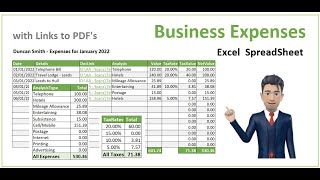
On the Income tab add columns for Date, Client or Source, Description, Category, Amount, Payment method, and Receipt. Enter each sale or payment as one row.
On the Expenses tab add Date, Supplier, Description, Category, Amount, Payment method, and Receipt. Record every business purchase, including small costs and subscriptions.
Use Data > Validation or a dropdown list for the Category column. Add categories such as sales, supplies, travel, software, rent, and bank fees.
In Summary, use SUMIF formulas to total income and expenses by category and month. Subtract total expenses from total income to show profit.
Add a Tax tab for the tax year, estimated tax set aside, and deductible expense totals. Update it monthly with figures from the Summary tab.
At month end, compare spreadsheet totals with bank and card statements. Mark cleared items and fix missing or duplicate entries.
Save a backup copy in cloud storage and keep receipts in dated folders. Do this before you share the file with an accountant.
Tips and common mistakes
Record transactions weekly so the job stays small.
Keep business and personal money in separate accounts to make matching easier.
Use the same category names everywhere so your SUMIF formulas work.
Check with an accountant about which expenses are deductible for your situation.
Questions
Do I need accounting software?
No. A simple spreadsheet works if you record every transaction and reconcile it monthly. Software helps if you need invoices, bank feeds, or payroll.
What columns should a bookkeeping spreadsheet have?
Include date, description, category, amount, payment method, and receipt reference. Add a client or supplier column if that helps you find entries.
How often should I update the spreadsheet?
Update it at least weekly and reconcile it with your bank and card statements each month. This keeps tax time much easier.
This guide was drafted from the video's details and general task knowledge. It has not been checked against the full video. Check the video and relevant product instructions before following a procedure. Report a correction.