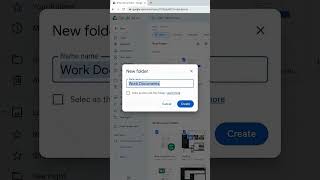
How to Organize Google Drive for Freelancers (Step-by-Step Folder Organization), by BloggyMary | Operations, Systems & Training on YouTube. 6 min 11 s.
- Video length
- 6 min 11 s
- Time to do it
- 30 minutes
- Difficulty
- Easy
- Steps
- 8
What you need
Steps
Open Google Drive in your browser and set aside a quiet half hour. Write down every client, project and admin area you handle so the new structure matches how you actually work.
Create seven top-level folders: Clients, Finance, Portfolio, Applications, SOPs, Templates and Personal Admin. Keep them at the root and use the same names every time.
Inside Clients, add one folder per client, named the same way each time, for example Client Name - Project. Add one subfolder for deliverables and one for admin inside each.
Stop nesting at three levels. If a file seems to need a fourth folder, give it a clear searchable name instead of burying it deeper.
Rename files with a fixed pattern: date first, then client or project, then document type, like 2026-03-14 Acme Invoice. This keeps sorting predictable.
Move existing files in small batches, dragging one folder at a time, and delete duplicates as you go. Check nothing is missing before you empty the trash.
Add an Archive folder inside each client folder for finished work. Active files stay visible and old ones are still there when a client asks.
Set sharing at the client folder level, with view or comment access for clients and editor access for anyone helping you. Review who has access once a month.
Tips and common mistakes
Test the setup by searching for a random file and timing it. If it takes more than 30 seconds, the folder names need work.
Never name a folder Misc, Stuff or New Folder. Those names hide files instead of sorting them.
Keep Personal Admin separate from client folders so a shared link never exposes your own documents.
When you build a system for a client, get their sign-off on folder names before you move a single file.
Questions
How many folders should I have at the top level?
Around seven works well: Clients, Finance, Portfolio, Applications, SOPs, Templates and Personal Admin. More than that and you start guessing where things belong.
Should I use My Drive or a shared drive?
My Drive is fine for a solo freelancer. Use a shared drive if a team needs files to stay put when someone leaves.
What should I do with old client files?
Move them into an Archive folder inside that client's folder instead of deleting them. You keep records for tax and handovers.
This guide was drafted from the video's details and general task knowledge. It has not been checked against the full video. Check the video and relevant product instructions before following a procedure. Report a correction.