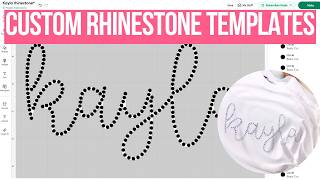
You will turn a design into a rhinestone template, cut it from flock, set the stones and press the finished transfer onto a shirt. It suits Cricut users who are new to rhinestones and have Design Space, flock, a cutting mat and a heat press. Check stone size before cutting.
YouTube video: How to Create & Press Rhinestone Templates with Cricut | 5-Part Beginner Guide!
Caption availability is unknown. Check the CC control in the YouTube player.
Choose a chapter (7)
- Video length
- 29 min 37 s
- Time to do it
- 2 hours
- Difficulty
- Medium
- Steps
- 8
What you need
Steps
Open Cricut Design Space and upload your artwork. Use the rhinestone tool or a rhinestone template file to convert the design into a grid of circles sized for your stones.
Check the circle diameter against your rhinestone size, such as SS10 or SS16. Adjust the spacing and resize the pattern until the holes match the stones you will use.
Place rhinestone flock on the cutting mat, load it in the Cricut and cut the template. Use a clean, sharp blade and test on a scrap first.
Weed away the cut circles and loose pieces so every stone hole is open. Keep the flock flat and avoid stretching the template.
Lay the flock template on a flat surface and fill each hole with a rhinestone, right side up. Brush or pour stones over the template and nudge them into place.
Press application tape over the filled template and rub it firmly. Lift the tape slowly so the stones stay stuck in the pattern.
Position the transfer on the shirt and heat press it following the flock and stone instructions. Cool slightly, then peel the tape away.
Check that every stone is fixed. If any lift, press that area again with the heat press or iron.
Tips and common mistakes
Always match the template circle size to the exact stone size before cutting.
Use a scrap of flock to test cut pressure so you do not cut through the backing.
Keep stones right side up; a rhinestone picker or wax pencil helps.
Heat press surfaces are hot, so keep fingers clear and follow the material settings.
Questions
Can I use a regular iron instead of a heat press?
Yes for some rhinestone transfers, but a heat press gives even pressure and a better hold. Follow the adhesive instructions.
What rhinestone size should a beginner use?
SS10 or SS16 are common choices. Pick one size and make the template holes match it.
Do I need special rhinestone flock?
Yes, use flock made for rhinestone templates. Regular vinyl may not hold stones or press correctly.
The notes are drafted automatically from video details and general task knowledge. How the guide was prepared
Report a correction