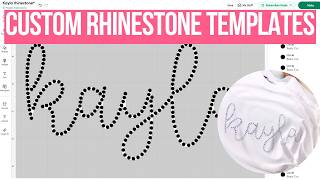
Build a rhinestone template in Silhouette Studio so the stones sit inside openings cut in heat transfer vinyl. You will cut both layers on a Cricut Maker, brush in the stones, and press the HTV first, then the rhinestones. It suits crafters with a cutting machine and a heat press.
YouTube video: How to Make a Rhinestone Template in Silhouette Studio | HTV & Cricut Tutorial
Caption availability is unknown. Check the CC control in the YouTube player.
- Video length
- 32 min 41 s
- Time to do it
- 1 to 2 hours
- Difficulty
- Medium
- Steps
- 8
What you need
Steps
Open Silhouette Studio and type your word, name or team text in a bold font. Size it to fit your shirt.
Use the rhinestone tools to convert the design into a stone pattern. Set the stone size to match your rhinestones and check the spacing looks even.
Create a second copy of the design as the HTV layer. Offset the outline so each stone opening has room inside the vinyl.
Send the rhinestone layer to the Cricut Maker and cut it from rhinestone flock. Weed away the holes so each stone has a pocket.
Cut the HTV layer from your vinyl, then weed the openings where the stones will sit.
Place the template on a tray and pour rhinestones over it. Brush them into the holes, then lift the template away.
Press the HTV onto the shirt first, following the vinyl brand's temperature and time. Let it cool and peel the carrier.
Align the rhinestones into the openings in the vinyl. Cover with a pressing sheet and press with the heat press using the stone maker's settings.
Tips and common mistakes
Always follow the temperature and press time for your own HTV and rhinestone brands, since they vary.
Test the stone size in Silhouette Studio against a real rhinestone before cutting to avoid holes that are too small.
Press the HTV before the rhinestones so the stones sit directly on the fabric, not on top of the vinyl.
Keep a spare piece of flock handy for a test cut on new template material.
Questions
Do I need Silhouette Studio Business Edition?
The rhinestone tools are part of the paid Business Edition. The free Basic Edition does not include them.
Can I cut the template on a Cricut instead of a Silhouette?
Yes. You design in Silhouette Studio, then send the cut file to the Cricut Maker through the software or by exporting it.
Why do the rhinestones go inside the HTV instead of on top?
The vinyl has openings cut where the stones sit, so the stones press straight onto the fabric for a flat, clean look.
The notes are drafted automatically from video details and general task knowledge. How the guide was prepared
Report a correction