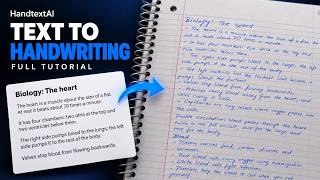
HandtextAI converts pasted text into a handwritten page you can download as JPG, PNG or PDF. It suits students making assignment pages, teachers building worksheets, and anyone who needs handwritten notes or cards. You only need a browser and some text to paste in.
YouTube video: Text to Handwriting Converter: Turn Typed Text into Real Handwriting
Captions are available. Use CC in the YouTube player.
Choose a chapter (5)
- Video length
- 1 min 4 s
- Time to do it
- 10 minutes
- Difficulty
- Easy
- Steps
- 8
What you need
Steps
Open HandtextAI in your browser and paste your text into the input box. You can copy a whole answer from Google Docs or ChatGPT and it becomes a full handwritten page.
Pick a handwriting from the 96 options. Search by number, script or language to narrow the list quickly.
Set the realism slider anywhere from Off to Lifelike. Higher settings add ink that darkens and fades and make no two letters look alike.
Choose your paper: plain, ruled, squared or a card style. The text is placed so it sits on the lines.
For maths, type your formula in LaTeX or use the Maths button so it is written by hand. Tables are drawn by hand too, and you can place images on the page.
Add hand marks such as highlights, boxes, circles and cross-outs in the same pen, plus ticks, arrows and shapes drawn on the page.
Select Print for a clean page to print, or Photo for a shot that looks like a real notebook page. Check the language and alphabet if your text is not Latin.
Download the page as JPG, PNG or PDF in Standard, HD or 4K quality.
Tips and common mistakes
Free previews carry a watermark, so create an account to get clean pages.
Use the Photo mode when a printed page would look too neat for the task.
Keep the realism setting moderate for long texts so the page stays readable.
Check that the chosen handwriting supports your language before you download.
Questions
Do I need an account to use it?
No. Free previews with a watermark work without signing up. A new account gets 5 free pages for clean downloads.
Can I write maths formulas by hand?
Yes. Type the formula in LaTeX or use the Maths button, and it is rendered in handwriting on the page.
What file formats can I download?
You can save the page as JPG, PNG or PDF in Standard, HD or 4K quality.
The notes are drafted automatically from video details and general task knowledge. How the guide was prepared
Report a correction