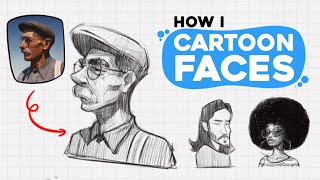
How I draw faces | step by step tutorial, by pikat on YouTube. 10 min 50 s.
- Video length
- 10 min 50 s
- Time to do it
- 1 to 2 hours
- Difficulty
- Medium
- Steps
- 9
What you need
Steps
Start with a loose rough sketch. Block in the head shape, hair mass and a rough idea of where the eyes, nose and mouth sit. Keep the lines light so you can change them.
Build the construction on top of the sketch. Use simple shapes to place the features and check the proportions of the face before you commit to details.
Make a quick values draft. Shade the face in grey to test where the light falls and whether the forms read clearly.
Draw the final lineart over the construction. Use a clean brush and vary line weight, keeping thinner lines around soft areas and heavier lines on the jaw and hair.
Check the face and fix anything that looks off. Flip the canvas or mirror the image to spot mistakes in the eyes, nose and mouth placement.
Fill in flat colours on separate layers under the lineart. Pick a base skin tone, then add flat colours for hair, eyes and clothes.
Add subtle forms and textures. Soften the skin with gentle shading and add small details like blush, freckles or hair strands.
Paint the light and shadow. Decide on one light source, then shade the shadow side of the face and add highlights on the nose, lips and eyes.
Fix the eyes last. Adjust the shape, pupils and highlights so both eyes match and look in the same direction.
Tips and common mistakes
Flip or mirror your canvas often, because mistakes in the face are much easier to see when the image is reversed.
Keep the rough sketch and construction on separate layers so you can hide them once the lineart is done.
Use a single light source for the whole face, or the shading will look flat and confusing.
Save a copy before you start colouring so you can go back to the lineart if the colours go wrong.
Questions
Do I need Clip Studio Paint to follow this?
No. The same steps work in any drawing app that has layers and a brush tool, such as Procreate or Photoshop.
How long does a face drawing take?
A first attempt can take one to two hours. With practice the sketch and lineart get much faster.
Can I do this with a mouse instead of a tablet?
Yes, but a tablet with pressure sensitivity makes lineart and shading much easier to control.
This guide was drafted from the video's details and general task knowledge. It has not been checked against the full video. Check the video and relevant product instructions before following a procedure. Report a correction.