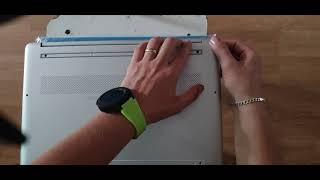
Dust blocking the intake and fans makes a Lenovo LOQ run hot, loud and slow in games. This guide walks you through opening the back panel, disconnecting the battery and clearing the vents and fans. It suits beginners and needs only a small screwdriver and a soft brush or air blower.
YouTube video: How to Clean Lenovo LOQ Vents (Stop Overheating & FPS Drops) | Quick Dust Removal
Caption availability is unknown. Check the CC control in the YouTube player.
Choose a chapter (7)
- Video length
- 5 min 11 s
- Time to do it
- 20 minutes
- Difficulty
- Easy
- Steps
- 9
What you need
Steps
Shut the laptop down and unplug the charger. Wait a few minutes so the fans stop and the case cools before you touch anything.
Lay the laptop face down on a clean, flat surface. Keep the screws in a small cup or tray so none go missing.
Remove every screw from the bottom cover. Note which holes are longer, since those screws go back in the same spots.
Slide a plastic pry tool into the seam and work around the edges until the back panel pops free. Lift it off gently.
Disconnect the battery connector from the motherboard. This cuts power so you cannot short anything while cleaning.
Hold the fans still with a finger or brush and blow air through the vents and fan blades. Work from the outside in so dust exits the case.
Brush dust off the air inlet filter and the fan housings. Wipe the inside of the back panel with a dry cloth.
Reconnect the battery, then press the back panel into place until all clips click. Refit the screws and tighten them evenly.
Power on and check that both fans spin freely and the laptop boots normally. Listen for any rubbing or rattle.
Tips and common mistakes
Never let a fan spin freely under compressed air, as it can damage the bearings.
Do not remove the heatsink or change thermal paste on a first clean. This guide only covers dust.
Work in a well-lit room and keep screws organised by position to avoid stripping threads.
Clean every few months if you game often in a dusty room.
Questions
Do I need to remove the heatsink to clean the fans?
No. You only need to open the back panel, disconnect the battery and clear dust from the vents and fan blades. Leave the cooling system and thermal paste alone.
Can I use a household vacuum on the fans?
Avoid it. Vacuums build static and can spin the fans too fast. Use a soft brush or a compressed air blower instead.
Will cleaning fix my FPS drops?
It often helps if dust was blocking airflow and causing heat throttling. If temperatures stay high after cleaning, check your fan settings and room temperature.
The notes are drafted automatically from video details and general task knowledge. How the guide was prepared
Report a correction