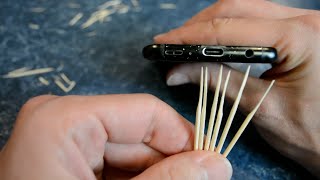
Lint, dust and grime build up inside USB-C ports and can stop cables from charging or syncing. This guide shows you how to clear the port safely with a few household tools. It suits anyone with a phone, tablet or laptop that has a USB-C port and takes only a few minutes.
YouTube video: How To Clean A USB-C Port
Captions are available. Use CC in the YouTube player.
- Video length
- 1 min 3 s
- Time to do it
- 5 minutes
- Difficulty
- Easy
- Steps
- 6
What you need
Steps
Power off the device and unplug any cable from the USB-C port.
Shine a flashlight into the port and look for lint, dust or grime packed against the back wall.
Use a wooden toothpick or plastic pick to gently scrape out loose lint. Never use metal pins or needles, which can bend the pins inside.
Give the port a short burst of compressed air to blow out the remaining dust. Hold the can upright.
Dampen a cotton swab with a little isopropyl alcohol and wipe the inside edges of the port. Do not drip liquid inside.
Let the port dry fully for a few minutes before you plug in a cable or turn the device back on.
Tips and common mistakes
Never push a metal tool into the port, since the pins are easy to bend and hard to fix.
Clean the port every few months if you carry your phone in a pocket or bag, where lint collects fast.
If the port still will not charge after cleaning, try a different cable before assuming the port is broken.
Questions
Can I use a vacuum to clean the port?
A vacuum can help pull out loose dust, but keep the nozzle away from the pins and never use a wet vacuum. Compressed air or a toothpick is safer for most people.
Is it safe to use alcohol on a USB-C port?
A small amount of isopropyl alcohol on a swab is fine for the plastic and metal edges. Keep it light, avoid dripping, and let the port dry before charging.
Why is my USB-C port not charging after cleaning?
Lint may still be packed at the back, or the cable itself may be worn. Try another cable and check the port again with a light.
The notes are drafted automatically from video details and general task knowledge. How the guide was prepared
Report a correction