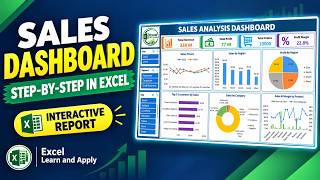
How to Make Excel Dynamic Dashboard for Sales in 3 Minutes, by Excel Visual on YouTube. 2 min 59 s.
- Video length
- 2 min 59 s
- Time to do it
- 45 minutes
- Difficulty
- Medium
- Steps
- 10
What you need
Steps
Lay out your sales data as a clean table with one row per sale. Include date, revenue, units sold, ad expense, product category and acquisition source.
Select the table and insert PivotTables on a separate sheet for each metric: monthly revenue, unit sales, ad expense and plan completion.
Build KPI cards on the main sheet. Link each card to a single value using a formula that points at the matching PivotTable cell.
Add a revenue trend chart and a unit sales chart from the PivotTables. Place them side by side under the KPI cards.
Create a revenue vs ad expense chart, such as a combo chart with columns for revenue and a line for ad expense, so overspend stands out.
Add a customer segmentation chart by acquisition source, for example a bar or pie chart from a PivotTable grouped by source.
Build a top 5 product category ranking with a PivotTable sorted by revenue and filtered to the top 5. Add simple icons or shapes next to the labels.
Create one detail sheet per KPI. On the main sheet, add shapes or KPI cards and link each one to its detail sheet with a hyperlink.
Add a back button on each detail sheet that links to the main dashboard. Test every link by clicking through each screen.
Format the dashboard with a light or dark colour scheme, hide gridlines and lock the layout so cards and charts stay aligned.
Tips and common mistakes
Keep all raw data on one sheet and never type values directly into charts, or the dashboard stops updating.
Refresh PivotTables after adding new sales rows, or the KPI cards will show old numbers.
Use consistent number formats on KPI cards so revenue and expense figures are easy to compare at a glance.
Save a copy of the template before editing so you can start over if a layout change goes wrong.
Questions
Do I need macros or VBA for this dashboard?
No. Everything can be built with PivotTables, PivotCharts, formulas and hyperlinks, which are native Excel features.
How do I make the KPI cards update automatically?
Point each card at a PivotTable cell or a formula like SUMIFS, then refresh the PivotTables when your data changes.
Can I use this layout for other metrics?
Yes. Swap the PivotTable fields for the metrics you track, such as leads, conversion rate or cost per order.
This guide was drafted from the video's details and general task knowledge. It has not been checked against the full video. Check the video and relevant product instructions before following a procedure. Report a correction.